Backend
Our backend stack is built on NestJS with Node.js, supporting both REST and GraphQL APIs. We emphasize modular architecture, type safety, and testability.
Architecture Overview
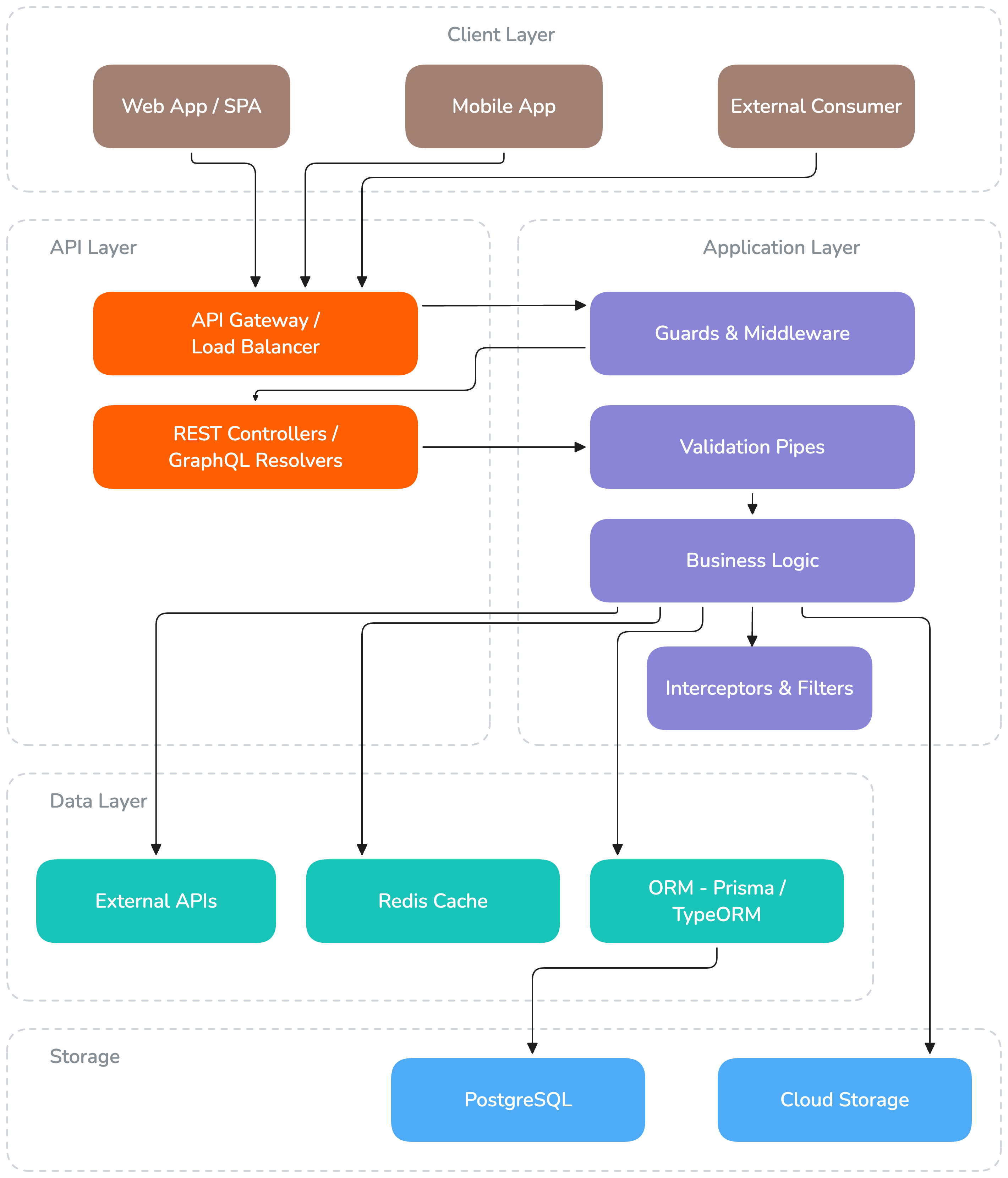
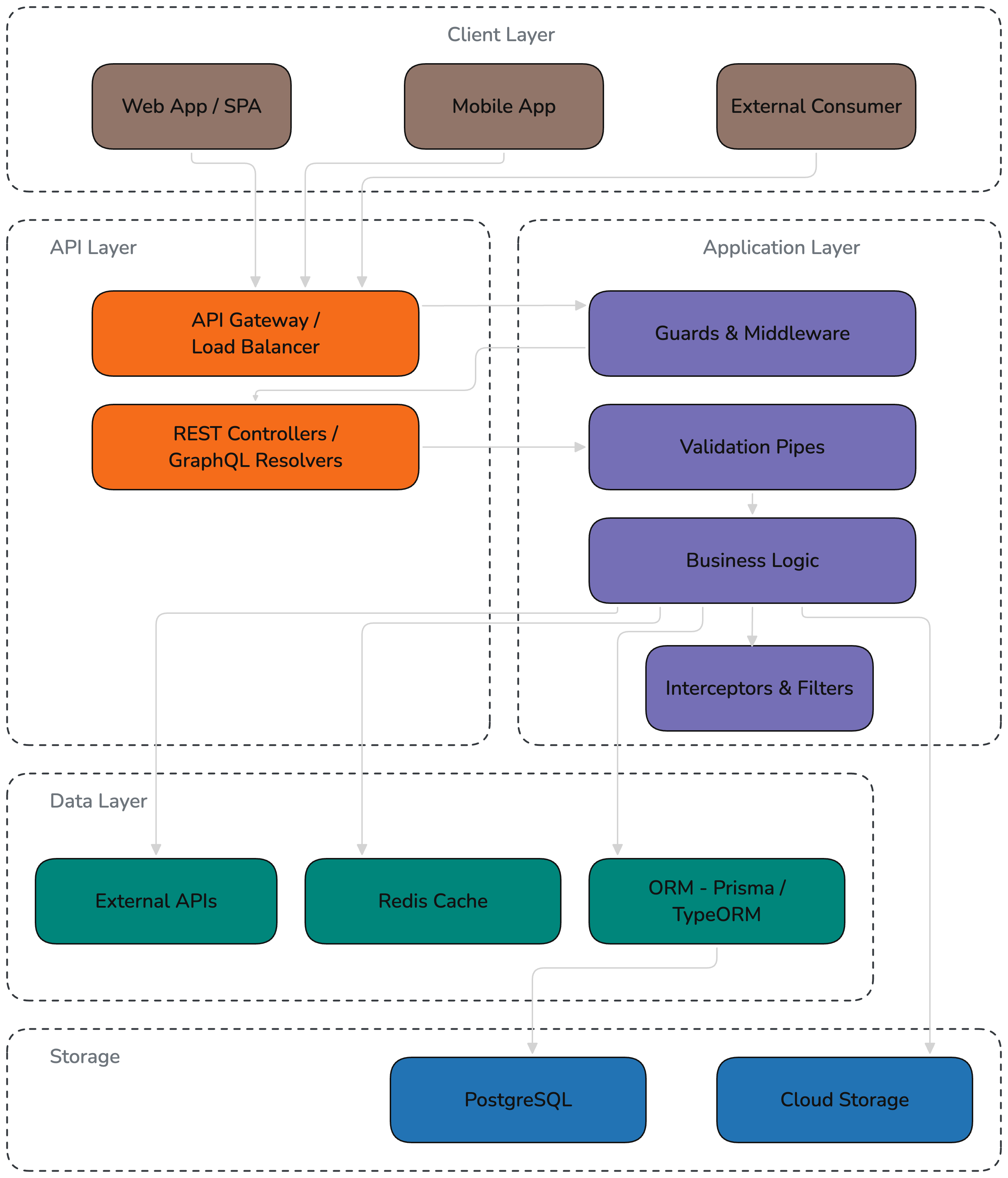
Core Technologies
NestJS
NestJS is our primary backend framework. It provides a structured, opinionated architecture with first-class TypeScript support, dependency injection, and a modular design that scales from small APIs to complex applications.
Why NestJS:
- Modular architecture — Encourages separation of concerns and code reuse across projects
- Dependency injection — Built-in IoC container for clean, testable service composition
- Protocol agnostic — Same codebase can serve REST, GraphQL, WebSockets, and gRPC
- Rich ecosystem — First-party packages for auth, config, caching, queues, scheduling, and more
- TypeScript native — Designed from the ground up for TypeScript, not retrofitted
- Enterprise-grade — Battle-tested patterns for validation, error handling, logging, and security
Trade-offs to consider:
- NestJS adds abstraction overhead — for simple APIs, this can mean higher development cost for clients
- The learning curve is steeper compared to plain Express/Fastify
- Some client budgets or project scopes don't justify the full NestJS setup
Choosing a Backend Framework
NestJS is the default, not a mandate. For projects where NestJS is overkill, consider lighter alternatives:
| Framework | When to use |
|---|---|
| NestJS | Medium-to-large projects, complex business logic, multiple modules, long-term maintenance |
| Express / Fastify | Small APIs, microservices, tight budgets, simple CRUD |
The decision should be made at project kickoff based on scope, budget, and expected complexity. Document the choice in the project README.
Request Lifecycle
Every incoming request passes through a well-defined pipeline of NestJS components:
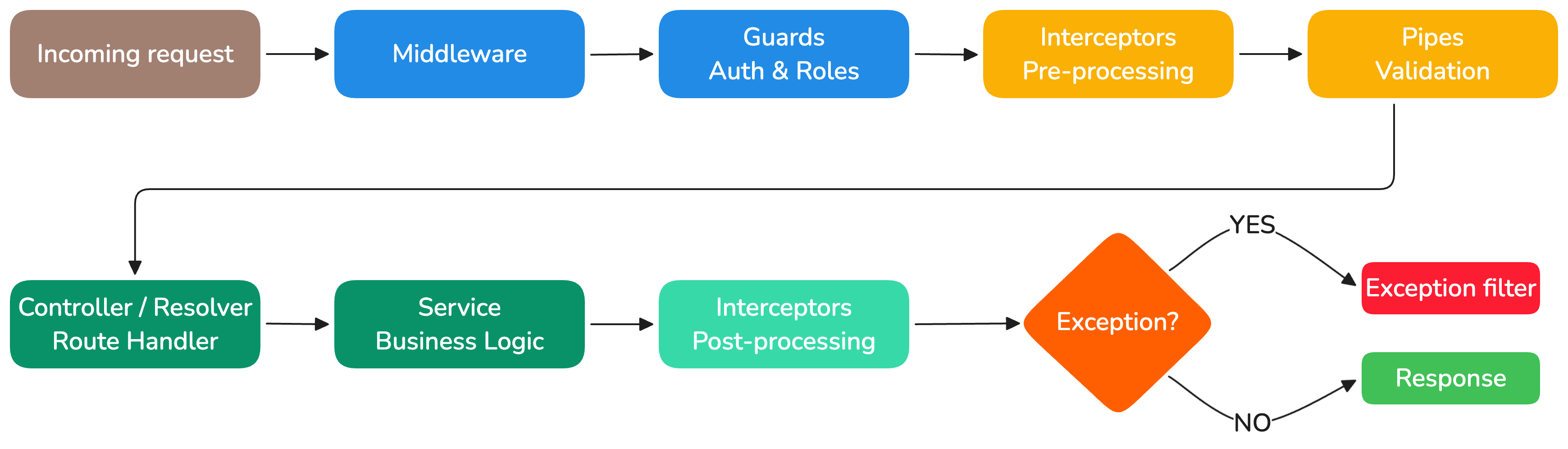
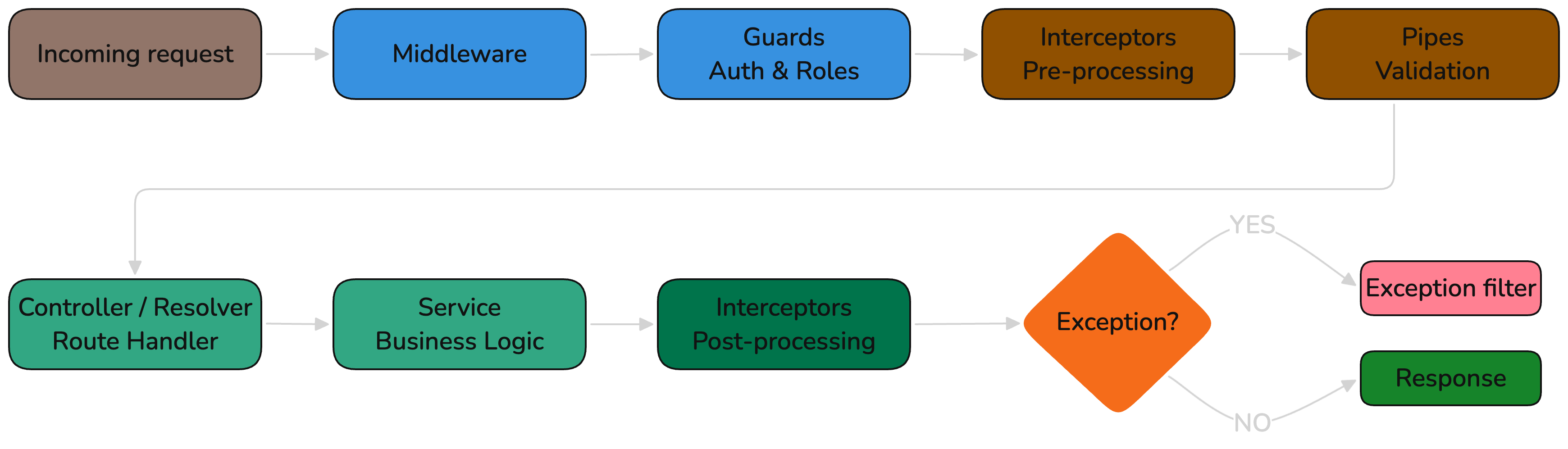
Each layer has a clear responsibility:
| Layer | Responsibility | Example |
|---|---|---|
| Middleware | Request preprocessing | CORS, body parsing, request logging |
| Guards | Authentication & authorization | JWT validation, role checks |
| Interceptors | Cross-cutting concerns | Response mapping, caching, timing |
| Pipes | Data validation & transformation | DTO validation, type coercion |
| Controllers/Resolvers | Route handling | Map HTTP/GraphQL requests to services |
| Services | Business logic | Core application functionality |
| Filters | Error handling | Standardized error responses |
Module Structure
Every NestJS project follows a modular architecture:
src/
├── app.module.ts           # Root module
├── shared/                 # Shared utilities, guards, interceptors
│   ├── guards/
│   ├── interceptors/
│   ├── filters/
│   └── decorators/
├── config/                 # Configuration and validation
├── auth/                   # Authentication module
│   ├── auth.module.ts
│   ├── auth.service.ts
│   ├── auth.controller.ts
│   └── strategies/
├── users/                  # Feature module
│   ├── users.module.ts
│   ├── users.service.ts
│   ├── users.controller.ts (REST) or users.resolver.ts (GraphQL)
│   ├── dto/
│   └── entities/
└── ...
Guidelines:
- One module per domain entity or feature area
- Modules expose only what's needed via
exports - Shared logic goes in
shared/ - Configuration is validated at startup using
@nestjs/configwith Zod or class-validator
API Patterns
REST
For standard CRUD operations and simple APIs, we use REST controllers:
@Controller('users')
export class UsersController {
    constructor(private readonly usersService: UsersService) {}

    @Get()
    findAll(@Query() query: PaginationDto): Promise<PaginatedResponse<UserResponseDto>> {
        return this.usersService.findAll(query)
    }

    @Get(':id')
    findOne(@Param('id', ParseUUIDPipe) id: string): Promise<UserResponseDto> {
        return this.usersService.findOne(id)
    }

    @Post()
    create(@Body() dto: CreateUserDto): Promise<UserResponseDto> {
        return this.usersService.create(dto)
    }
}
GraphQL
For complex data requirements or when the frontend needs flexible queries, we use GraphQL with the code-first approach:
@Resolver(() => UserType)
export class UsersResolver {
    constructor(private readonly usersService: UsersService) {}

    @Query(() => [UserType])
    async users(): Promise<UserType[]> {
        return this.usersService.findAll()
    }

    @Mutation(() => UserType)
    async userCreate(@Args('input') input: UserCreateInput): Promise<UserType> {
        return this.usersService.create(input)
    }

    @ResolveField(() => [ProjectType])
    async projects(@Parent() user: UserType): Promise<ProjectType[]> {
        return this.usersService.getProjects(user.id)
    }
}
Choosing an API Style
REST is the default. GraphQL adds complexity (schema management, N+1 queries, caching challenges) and should only be used when its benefits clearly outweigh the cost.
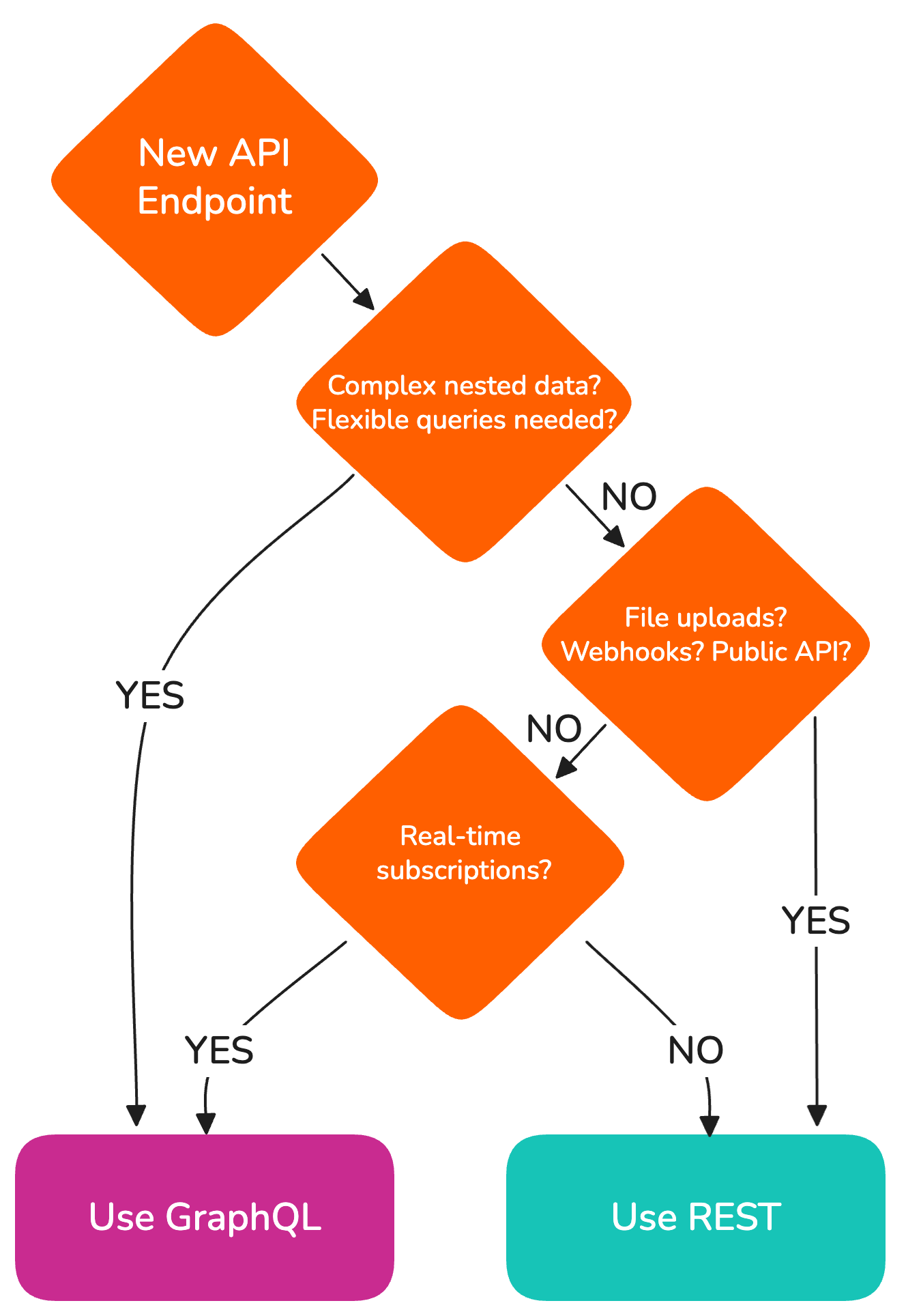
| Use REST when... | Use GraphQL when... |
|---|---|
| Simple CRUD operations | Multiple clients with diverging field requirements |
| Public APIs for third parties | Frontend needs flexible queries across many entities per request |
| File uploads / downloads | Real-time subscriptions needed |
| Webhooks, callbacks, and scheduled jobs (external scheduler hits an API-key-protected endpoint) | Schema-driven typed clients are a hard requirement |
| Most projects (default) | Only when justified by a concrete need above |
GraphQL Considerations
GraphQL is powerful but adds operational cost: schema management, query complexity limits, caching strategies, and tooling overhead. "Complex data" alone is not a strong enough signal — in practice, frontends often end up consuming GraphQL the same way they would REST (one query per screen, fixed shape), at which point you have all the GraphQL costs without the benefits. Adopt it only when there's a concrete problem REST can't solve well (multiple clients with diverging field needs, real-time subscriptions, deep partial fetching) and you have a plan for breaking changes. We don't currently have a robust schema versioning story beyond suffixing types and operations (UserTypeV2, userCreateV2), which is another reason to be conservative.
Validation
All incoming data is validated using DTOs with class-validator:
// dto/create-user.dto.ts
export class CreateUserDto {
    @IsEmail()
    email: string

    @IsString()
    @MinLength(2)
    @MaxLength(100)
    name: string

    @IsEnum(UserRole)
    role: UserRole
}
Nested data with class-validator
class-validator does not recursively validate nested objects or arrays of objects by default — and the failure mode is silent. To validate a nested DTO you need both @ValidateNested() (from class-validator) and @Type(() => NestedDto) (from class-transformer). Forget either one and the nested payload passes through unchecked, even with ValidationPipe enabled.
export class CreateOrderDto {
    @IsString()
    customerId: string

    @ValidateNested({ each: true })
    @Type(() => OrderItemDto)
    items: OrderItemDto[]
}

export class OrderItemDto {
    @IsUUID()
    productId: string

    @IsInt()
    @Min(1)
    quantity: number
}
Always configure ValidationPipe with whitelist: true and forbidNonWhitelisted: true so unknown fields are rejected at the API boundary rather than silently ignored. Discriminated unions and generic types are also poorly supported — if your payloads need them, consider Zod for that DTO instead.
Architecture: Monolith vs. Services
Start with a modular monolith. Only split into dedicated services when there is a clear, justified need.
| Approach | When to use |
|---|---|
| Modular monolith | Most projects. Single deployable, modules separated by NestJS module boundaries. Simpler ops, easier debugging. |
| Dedicated services | When parts of the system have fundamentally different scaling, deployment, or team ownership needs. |
Signs you need to split:
- One part of the system needs independent scaling (e.g. heavy background processing)
- Different release cadences for different parts
- Separate teams owning separate domains
- A module's failure should not bring down the rest
Rules for services:
- Each service owns its data — no shared databases
- Services communicate via REST APIs or message queues, not direct DB access
- Every service must be independently deployable and have its own CI/CD pipeline
- Document service boundaries and communication contracts
Node.js Runtime
- We use the LTS version of Node.js specified in each project's
.nvmrc - Package manager: yarn (primary across all projects); a transition to pnpm is currently being explored on selected projects
- All projects include
enginesfield inpackage.jsonto enforce Node.js version