Database
We use PostgreSQL as our primary relational database and MongoDB for specific use cases. Database access is through an ORM — Drizzle for new projects, TypeORM in legacy projects. Raw SQL queries are acceptable when the query is too complex to express cleanly with the ORM.
Data Architecture
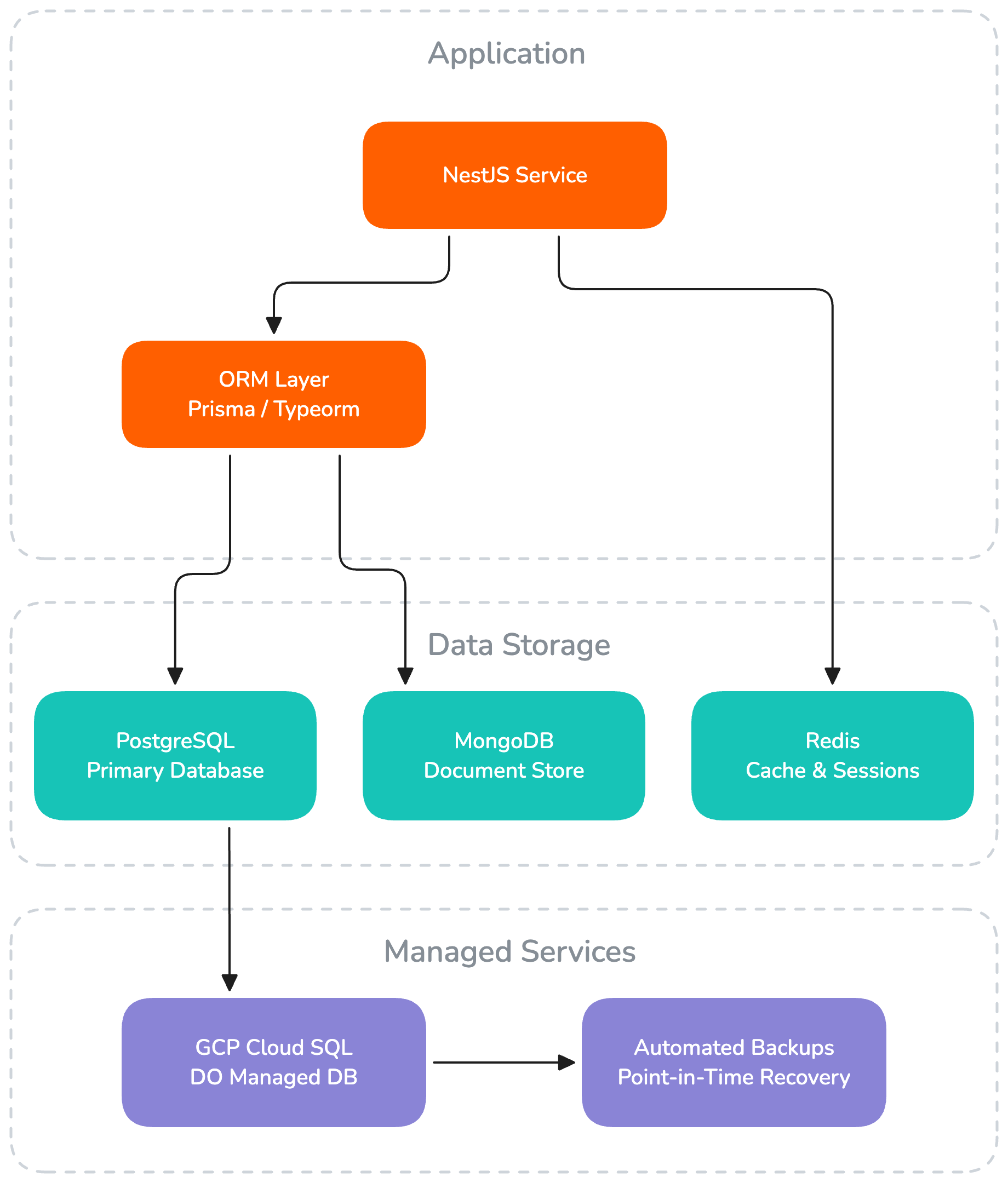
PostgreSQL
PostgreSQL is the default choice for all new projects. It provides strong ACID compliance, excellent JSON support, and a rich feature set that covers the vast majority of our data requirements.
Why PostgreSQL:
- Reliability — Proven in production at scale across thousands of organizations worldwide
- ACID compliance — Full transactional support with referential integrity
- Rich data types — Native JSON/JSONB, arrays, enums, UUID, and more
- Performance — Advanced query planner, indexing strategies, and parallel query execution
- Extensibility — Full-text search, PostGIS for geospatial data, and a rich extension ecosystem
- Managed hosting — Available as a managed service on both GCP (Cloud SQL) and Digital Ocean
When we use PostgreSQL:
- Structured, relational data with well-defined schemas
- Applications requiring transactions and referential integrity
- Most CRUD-based projects (which covers the majority of our work)
MongoDB
MongoDB is used in projects where the data model is inherently document-oriented or when working with highly variable schemas.
When we use MongoDB:
- Document-oriented data (CMS content, logs, event streams)
- Rapidly evolving schemas during prototyping
- When explicitly required by a project's data model
ORM Choices
Drizzle
Drizzle is the default ORM for all new projects. It is lightweight, SQL-first, and provides full TypeScript type safety with minimal abstraction over the underlying database.
// db/schema/users.ts
import { pgTable, uuid, varchar, timestamp } from 'drizzle-orm/pg-core'

export const users = pgTable('users', {
    id: uuid('id').defaultRandom().primaryKey(),
    email: varchar('email', { length: 255 }).notNull().unique(),
    name: varchar('name', { length: 255 }).notNull(),
    createdAt: timestamp('created_at').defaultNow().notNull(),
})
Why Drizzle:
- SQL-first — Schema and queries closely mirror SQL, making behavior predictable and transparent
- Full type safety — Query results are fully typed without code generation at runtime
- Lightweight — Minimal overhead, no hidden magic
- Great DX —
drizzle-kithandles migrations, schema introspection, and studio
TypeORM (Legacy)
TypeORM is used in older projects and is not recommended for new ones. It relies heavily on decorators and runtime reflection, which adds complexity and makes behavior harder to predict.
// entities/user.entity.ts
@Entity()
export class User {
    @PrimaryGeneratedColumn('uuid')
    id: string

    @Column({ unique: true })
    email: string

    @Column()
    name: string

    @CreateDateColumn()
    createdAt: Date

    @OneToMany(() => Project, (project) => project.owner)
    projects: Project[]
}
Existing projects using TypeORM should continue using it — there is no need to migrate actively.
Migration Strategy
Database schema changes are always managed through migrations — never manual DDL.


Rules
- Every schema change gets a migration — no exceptions
- Migrations are committed to version control alongside the code that uses them
- Migrations run automatically in CI/CD before the application starts
- Never edit an existing migration that has been applied to any environment
- Test migrations against a copy of production data when possible
Example: Drizzle Migrations
# Generate a migration after changing the schema
yarn drizzle-kit generate

# Apply migrations
yarn drizzle-kit migrate
Example: TypeORM Migrations (Legacy)
# Generate a migration from entity changes
yarn typeorm migration:generate -n AddUserRole

# Run pending migrations
yarn typeorm migration:run
Connection Management
- Use connection pooling (configured in the ORM or via PgBouncer for high-traffic apps)
- Set reasonable pool sizes:
min: 2, max: 10for development, adjust for production based on load - Always close connections gracefully on app shutdown
Backups
- Production: Automated daily backups via the hosting provider (GCP Cloud SQL / Digital Ocean Managed Database)
- Staging: Weekly backups or on-demand snapshots
- Development: No backups needed — use seed scripts to recreate data